infinigen2 examples#
Each example is a single standalone script that renders a multi-pass video dataset with infinigen2. Each example script is extremely customizeable. You can call additional object / scene generators from the docs, change what ExportTypes are rendered, or add additional rendering steps with objects or settings changed.
flying_indoor [source]#
A stereo video of a furnished room with animated floating objects and lights, with ground truth for the left camera. Renders a fixed 24-frame 1280x720 clip.
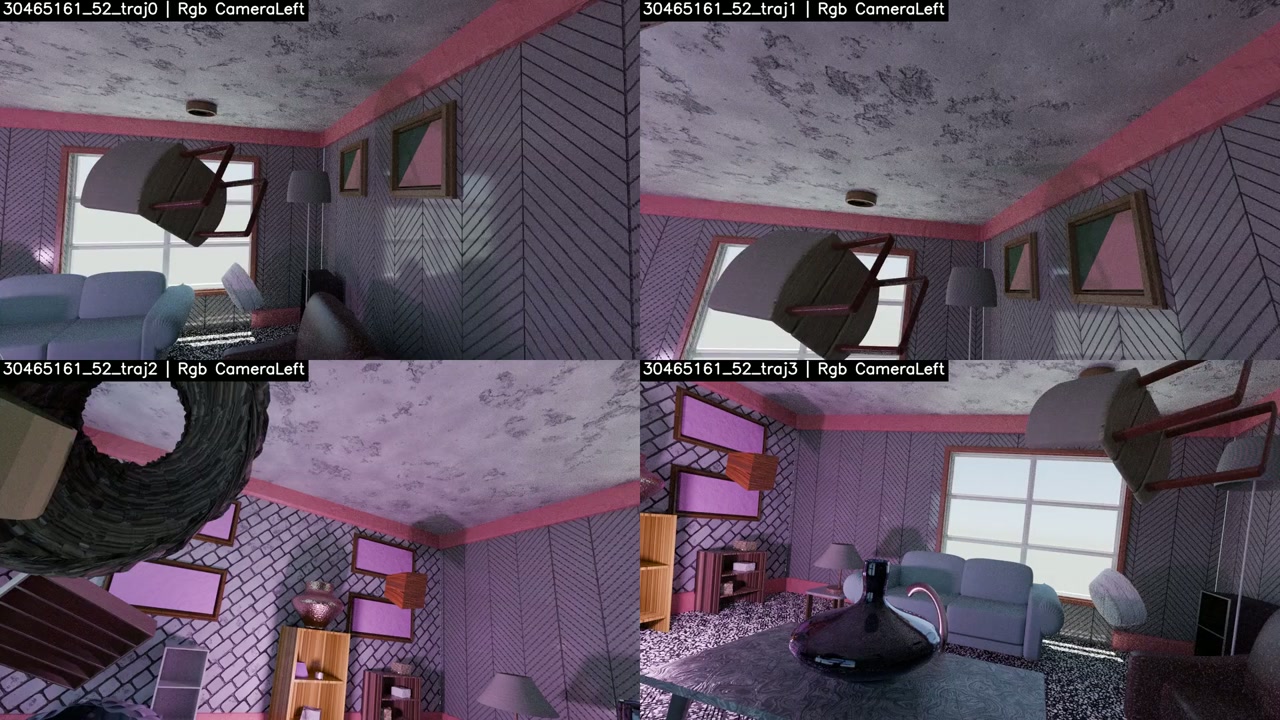
▶ Watch the 2.0.0a2 flying-indoor video | 📦 Download pregenerated data for this setting here!
If you wish to generate data similar to the video or datarelease, you must install infinigen==2.0.0a2. Otherwise, you will produce data from a newer version, possibly with different objects and materials, but still matching the overall design of flying objects in an indoor room.
This example is grouped under examples/flying_indoor/:
render.py— the render script.cvdpack.json— the cvdpack config that packs a rendered clip into per-camera videos.sbatch.sh— a SLURM array script that renders, packs, and offloads a dataset.
To render a single camera locally, please run:
uv run python examples/flying_indoor/render.py --seed 0 --camera_idx 0 --trajectory_seed 0 --output outputs/flying_indoor
--seedis the random seed used to determine the base 3D scene (including objects, materials, lights, layout).--trajectory_seedis the random seed used to determine only the camera trajectory. Changing this seed re-randomizes the trajectory without affecting the base 3D scene.--camera_idx {0,1}chooses which stereo camera to render (0 = left, 1 = right). You must run render.py twice for each seed pair (seedandtrajectory_seed) to get stereo data.
By running both camera_idx for a single seed pair, you will receive the following data:
left — rgb +
camera.npz, plusmaterial-index,diffuse-color,environmentpasses.right — rgb +
camera.npz.left gt —
depth/surface-normal/object/optical-flow.npy.right gt —
depth.npy.metadata.json(seed, per-pass runtimes, exports), written by the left-camera shard.
To render a dataset on SLURM, sbatch.sh runs one array task per (scene, trajectory, camera), with NUM_TRAJECTORIES unique trajectories per scene (default 4). Each task renders raw frames to fast local SCRATCH_DIR, packs them with cvdpack, and offloads only the compressed videos to FINAL_DIR, then deletes the raw frames:
sbatch examples/flying_indoor/sbatch.sh
💡 Edit the hardcoded SCRATCH_DIR (node-local scratch) and FINAL_DIR (permanent storage) at the top of sbatch.sh to suit your cluster, size --array as N_SCENES * NUM_TRAJECTORIES * 2, and adjust --partition/--account/other SLURM configs.
panning video of clay-material scenes [source]#
A linear camera pan of a livingroom, diningroom, bedroom, bathroom, kitchen or indoor space (--scene_type), rendered in several passes: clay, ambient occlusion, rgb, and ground truth.
wget https://raw.githubusercontent.com/princeton-vl/infinigen/main/examples/clay_orbit/render.py
uv run python render.py --scene_type livingroom --seed 0 --output outputs/clay_pan_video
Each pass writes %c/<name>-%f.png under --output (%c = camera, %f = frame):
clay-flat + ao-flat — undisplaced mesh (
DisplacementMode.NONE), with a camera-parented fill light.clay + ao-disp — displaced mesh (
DISPLACEMENT_AND_BUMP); fine surface detail shows up in the AO pass.rgb — full materials, plus
camera.npz.gt —
depth/surface-normal/object/optical-flow.npy; skipped with--skip_gt.
house tour video [source]#
A collision-free RRT camera tour through three or four connected rooms of a procedurally generated house. Only the toured rooms are furnished and decorated, and subdivision is stripped from geometry outside them to keep the render light.
uv run python examples/house_tour/render.py --seed 0 --output outputs/house_tour
--seedsets the house layout, furniture and small objects;--trajectory_seed(defaults to--seed) re-chooses the toured rooms and camera path without changing the house.--frames(default1 240) is the planned tour length;--render_framesrenders a sub-range of that same trajectory, so shards can split one tour.--room_count(default 5),--resolution(default640 360) and--samples(default 128) control the house size and render quality.Scenes whose render-level triangle count exceeds
--max_render_tris(default 32M), or where no tour can be planned, raiseRejectedScene; try another seed.
The output folder receives rgb frames %c/%f.png, camera.npz, and metadata.json with seeds and per-step timings.